flowchart LR
SETUP["setup<br/><i>Create schemas</i>"] --> BRONZE["bronze_ingestion<br/><i>Read Parquet</i>"]
BRONZE --> SILVER["silver_cleaning<br/><i>Filter & enrich</i>"]
SILVER --> GOLD["gold_kpis<br/><i>12 aggregations</i>"]
GOLD --> VALIDATE["validate<br/><i>SQL checks</i>"]
classDef task fill:#0369a1,color:#fff,stroke:#075985
classDef final fill:#107c10,color:#fff,stroke:#0a5c0a
class SETUP,BRONZE,SILVER,GOLD task
class VALIDATE final
Module 5: Production Patterns
Scheduling, CI/CD, and go-live checklist


Duration: 45 min — Animation (3) · Think & Discuss (7) · Theory (15) · Quiz (3) · Practice (17)
1. Animation
2. Think & Discuss
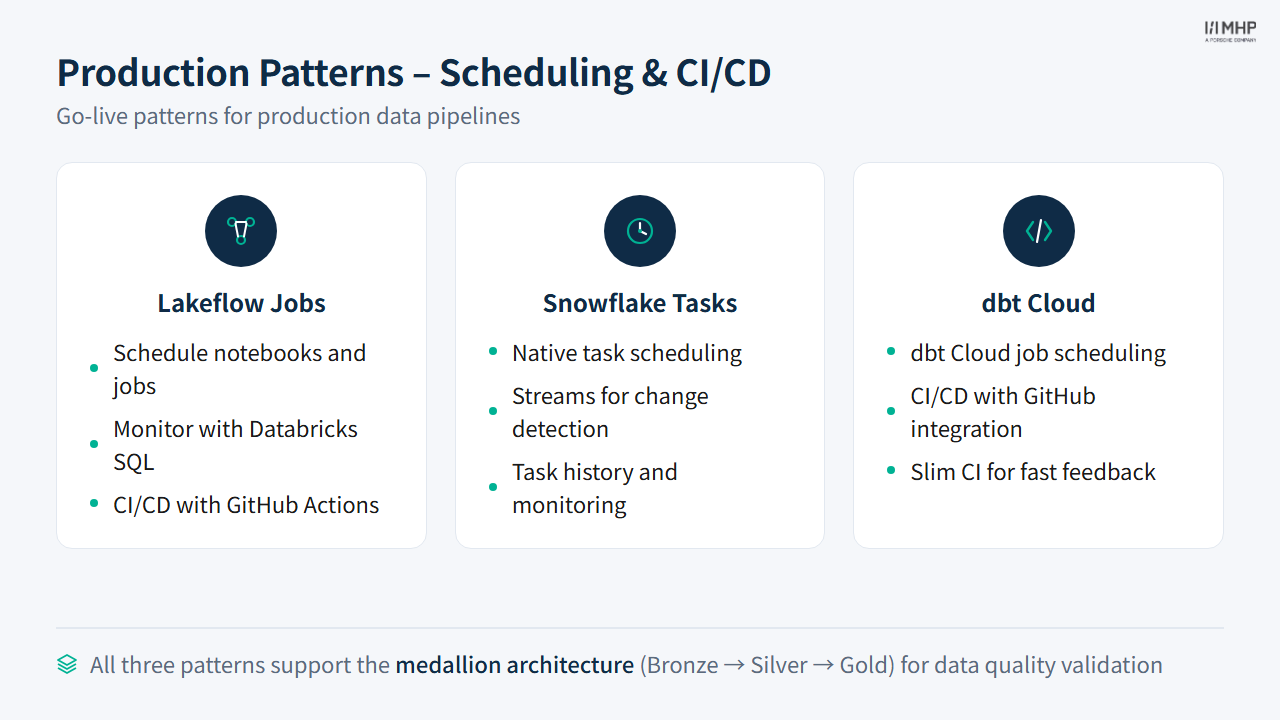
Situation: The pipeline works in notebooks and manual dbt runs. Elena asks: “What executes every night when we are not in the room?” YellowLine NYC needs scheduled, monitored, reliable jobs.
Prompts:
- What is different about production compared to the lab environment you used this morning?
- What breaks in production that almost never breaks in a classroom exercise?
- How would you schedule nightly Bronze → Silver → Gold on Databricks, Snowflake, and dbt?
- If Silver fails at 2 a.m., who should know? What should happen to Gold KPIs?
- An analyst edits a SQL model on Friday afternoon — what process stops that change from breaking Monday’s dashboard?
3. Theory
NoteVendor naming (2026)
| Legacy name in repo | Say in class |
|---|---|
| Delta Live Tables (DLT) | Lakeflow Spark Declarative Pipelines (LSDP) |
| Databricks Workflows / Jobs | Lakeflow Jobs |
@dlt.table / dlt.read() |
@dp.materialized_view + spark.read.table() (legacy @dlt still works) |
Lab file dlt_pipeline.py uses the 2026 pyspark.pipelines API — legacy import dlt still works on Databricks.
3.1 The Big Question
You just learned to build pipelines. But you wouldn’t run notebooks in production.
This module bridges the training-to-production gap — showing how each tool deploys pipelines in the real world.
3.2 Training vs Production
| Aspect | Training (Today) | Production (Real World) |
|---|---|---|
| Databricks |
Interactive notebooks | LSDP + Lakeflow Jobs + Declarative Automation Bundles |
| Snowflake |
Workspaces SQL files / Snowpark scripts | Tasks + Streams + Stored Procs + Snowflake CLI |
| dbt |
Manual dbt run in terminal (Core CLI) |
GitHub Actions CI + dbt build on cron; dbt Cloud optional |
| Orchestration | Manual, sequential | Scheduled, event-driven, automated |
| Error handling | Interactive debugging | Retries, alerts, logging |
| Deployment | Copy/paste or import | Git + CI/CD + infrastructure as code |
| Testing | Ad-hoc SELECT COUNT(*) |
Automated tests on every change |
3.3 Databricks Production Patterns
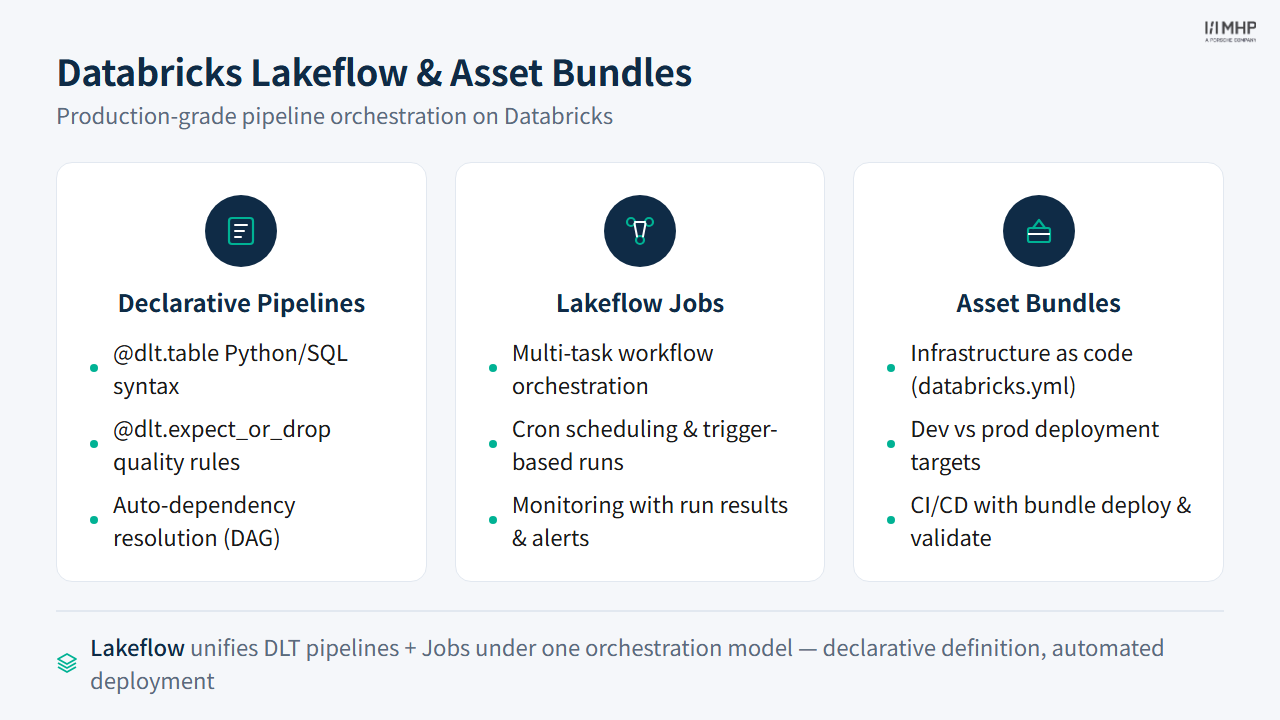
Lakeflow Spark Declarative Pipelines (LSDP, formerly DLT)
Note2026 API in workshop lab code
databricks/production/dlt_pipeline.py uses the current from pyspark import pipelines as dp API with @dp.materialized_view and spark.read.table(). The legacy import dlt / @dlt.table / dlt.read() decorators still work on Databricks — same pipeline engine, older import path. No migration is required for this workshop.
LSDP replaces notebooks with declarative pipeline definitions:
from pyspark import pipelines as dp

@dp.materialized_view(name="silver_nyc_taxi_cleaned")
@dp.expect_or_drop("valid_distance", "trip_distance > 0")
def silver_nyc_taxi_cleaned():
    return spark.read.table("bronze_nyc_taxi_trips").filter(...)
The legacy import dlt API (@dlt.table, dlt.read()) still works — same concepts, older import path.
Key benefits:
- You declare what each table should contain — LSDP figures out how to run it
@dp.expect_or_drop/@dp.expectenforce data quality with automatic violation metrics- Execution order is inferred from
spark.read.table()references (Bronze → Silver → Gold) - Auto-scaling, auto-retry, built-in lineage in Unity Catalog
Lakeflow Jobs (formerly Databricks Workflows)
Schedule notebook pipelines as multi-task jobs with dependency DAGs:
- Task chaining: setup → bronze → silver → gold
- Retry policies per task
- Email/Slack alerting on failure
- Cluster policies for cost control
Declarative Automation Bundles (DABs)
NoteVendor naming (2026)
Databricks Asset Bundles were renamed to Declarative Automation Bundles in March 2026. The CLI commands (databricks bundle deploy) and YAML configuration remain the same — only the product name changed.
Infrastructure-as-code for Databricks:
databricks bundle deploy -t prod # Deploy pipeline + job from GitFile: databricks/production/asset_bundle/databricks.yml — packages everything into a deployable bundle.
Job clusters vs all-purpose clusters
In production, always use job clusters (created fresh per run and terminated on completion) instead of all-purpose clusters left running. Job clusters cost ~5x less per DBU and eliminate the #1 cause of unexpected cloud bills in Databricks: forgotten interactive clusters. Combine with cluster policies to cap maximum worker count and prevent runaway costs.
3.4 Snowflake Production Patterns
Streams + Tasks
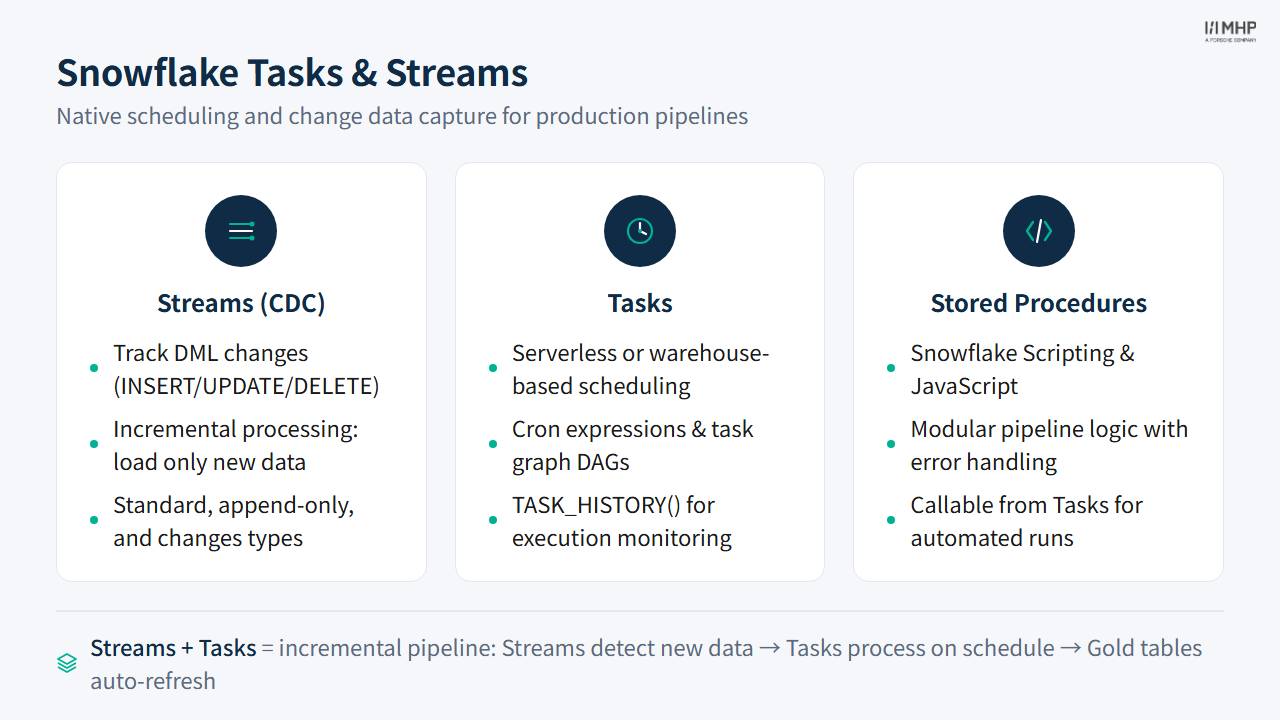
Streams detect changes (CDC). Tasks run on schedule or when triggered:
USE ROLE      DE_WORKSHOP_ROLE;
USE DATABASE  DE_MASTERCLASS;
USE WAREHOUSE DE_WORKSHOP_WH;

-- Stream tracks INSERT/UPDATE/DELETE changes on the Bronze table (CDC)
CREATE OR REPLACE STREAM bronze_trips_stream
    ON TABLE bronze_nyc_taxi_trips;

-- Root task: poll every 5 min, fire only when new data has arrived
CREATE OR REPLACE TASK refresh_silver
  WAREHOUSE = DE_WORKSHOP_WH
  SCHEDULE  = 'USING CRON 0 6 * * * Europe/Berlin'
  WHEN SYSTEM$STREAM_HAS_DATA('bronze_trips_stream')
AS
  -- Silver transformation SQL (incremental, reads from stream)
  ;

-- Child task: runs automatically after refresh_silver completes (task DAG)
CREATE OR REPLACE TASK refresh_gold
  WAREHOUSE = DE_WORKSHOP_WH
  AFTER refresh_silver
AS
  -- Gold KPI refresh SQL
  ;

-- Tasks are SUSPENDED by default — must be explicitly enabled
ALTER TASK refresh_gold  RESUME;
ALTER TASK refresh_silver RESUME;
flowchart TD
BRONZE_TABLE[("Bronze Table")] --> STREAM["Stream<br/><i>detects new rows (CDC)</i>"]
STREAM -->|"SYSTEM$STREAM_HAS_DATA()"| TASK_SILVER["Task: refresh_silver<br/><i>SCHEDULE = '0 6 * * *'</i>"]
TASK_SILVER --> SILVER_TABLE[("Silver Table")]
TASK_SILVER -->|"AFTER (task DAG)"| TASK_GOLD["Task: refresh_gold"]
TASK_GOLD --> GOLD_TABLE[("Gold Tables")]
classDef table fill:#01065c,color:#fff,stroke:#000940
classDef stream fill:#29B5E8,color:#fff,stroke:#1e9bc9
classDef task fill:#0369a1,color:#fff,stroke:#075985
class BRONZE_TABLE,SILVER_TABLE,GOLD_TABLE table
class STREAM stream
class TASK_SILVER,TASK_GOLD task
Stored Procedures
Wrap pipeline logic in callable units:
USE ROLE      DE_WORKSHOP_ROLE;
USE DATABASE  DE_MASTERCLASS;
USE WAREHOUSE DE_WORKSHOP_WH;

CREATE OR REPLACE PROCEDURE run_silver_pipeline(attendee VARCHAR)
    RETURNS VARCHAR
    LANGUAGE SQL
    EXECUTE AS CALLER
AS
BEGIN
    -- Silver transformation logic (parameterized by attendee schema)
    RETURN 'Silver pipeline completed';
END;

CALL run_silver_pipeline('de_01_alice');
Snowpark Stored Procedures
Deploy Python code as native Snowflake procedures:
session.sproc.register(
    func=run_silver_pipeline,
    name="run_silver_sproc",
    packages=["snowflake-snowpark-python"],
    is_permanent=True,
    stage_location="@~/sproc_stage",
    replace=True,
)

# Invoke like any SQL stored procedure
session.call("run_silver_sproc", ATTENDEE_ID)
Snowflake DevOps: Git + CLI + CI/CD
Beyond runtime scheduling (Tasks + Streams), production Snowflake projects use Git as the source of truth and Snowflake CLI for automated deployment:
# Deploy SQL/Python scripts from Git to Snowflake
snow git fetch my_git_repo
snow git execute @my_git_repo/branches/main/scripts/* \
    -D "environment='prod'"
Building blocks (Snowflake DevOps docs):
| Feature | Purpose |
|---|---|
| Git repository clone | Connect remote Git repo to Snowflake — browse and execute versioned code |
EXECUTE IMMEDIATE FROM |
Run SQL from a Git repo file (supports Jinja2 templates) |
CREATE OR ALTER |
Declarative object management — create or update to match definition |
| Snowflake CLI | snow git fetch / snow git execute in CI/CD pipelines |
| Jinja2 parameterization | Same script, different environments ({ environment } → dev / prod) |
GitHub Actions example (official docs):
name: Deploy to Snowflake
on:
  push:
    branches: [ main ]
jobs:
  deploy:
    runs-on: ubuntu-latest
    env:
      SNOWFLAKE_CONNECTIONS_DEFAULT_ACCOUNT: ${{ secrets.SNOWFLAKE_ACCOUNT }}
      SNOWFLAKE_CONNECTIONS_DEFAULT_USER: ${{ secrets.SNOWFLAKE_USER }}
      SNOWFLAKE_CONNECTIONS_DEFAULT_PASSWORD: ${{ secrets.SNOWFLAKE_PASSWORD }}
    steps:
      - uses: actions/checkout@v4
      - uses: Snowflake-Labs/snowflake-cli-action@v1.5
        with:
          cli-version: "latest"
          default-config-file-path: ".snowflake/config.toml"
      - run: snow git fetch my_git_repo
      - run: |
          snow git execute @my_git_repo/branches/main/scripts/* \
            -D "environment='prod'"
Separation of concerns: deployment vs scheduling
In production Snowflake, deployment (how code gets to Snowflake) and scheduling (when code runs) are separate:
- Deploy: Snowflake CLI + GitHub Actions push new stored procedures, tasks, and SQL scripts from Git
- Schedule: Tasks + Streams define when those deployed objects run (cron or event-driven)
This is analogous to Databricks (deploy with databricks bundle deploy → schedule with Lakeflow Jobs) and dbt (deploy via dbt build in CI → schedule with GitHub Actions cron, an orchestrator, or optionally dbt Cloud).
3.5 dbt Production Patterns
GitHub Actions CI
Automated testing on every pull request:
- name: dbt build (slim CI)
  run: dbt build --select state:modified+ --defer --state ./target
Slim CI only tests changed models + downstream — saves time and cost.
NoteState-aware runs (generally available 2026)
dbt now supports state-aware runs that detect which models have changed since the last run and only rebuild those — saving significant compute time on large projects. Combined with --select state:modified+, dbt compares the current project state against a previous manifest and skips unchanged models entirely. This is especially valuable for Gold-heavy projects where upstream Silver models rarely change.
dbt Cloud (optional — facilitator comparison)
Trainees ran dbt Core CLI locally in Module 4. dbt Cloud is a managed alternative for teams that want hosted scheduling and docs without building CI themselves:
- Scheduled jobs: daily
dbt buildwith alerting - CI jobs: automatic PR checks
- Hosted documentation
- Copilot: AI-assisted SQL, docs, tests (Starter+ plans)
“Works on my machine” is not production-ready
The most common production incident pattern: a pipeline runs fine in a development notebook or local dbt environment, then fails in production due to (a) different schema permissions, (b) hard-coded paths or attendee IDs, or (c) missing dependencies that were loaded interactively. Always test with dbt build in a clean environment that mirrors production — and never hard-code attendee IDs, warehouse names, or file paths that change between environments.
Blue-green deployment for data pipelines
For mission-critical pipelines, consider a blue-green deployment pattern: maintain two parallel environments (blue = current production, green = new version). Deploy changes to green, validate with dbt build and automated tests, then switch traffic by updating the production schedule to point at green. This enables zero-downtime releases and instant rollback — if green produces incorrect results, simply re-enable blue’s schedule. Databricks supports this via Asset Bundles (--target prod-blue / --target prod-green); dbt teams often use separate schemas or targets in Core + CI, or separate dbt Cloud environments.
3.6 Key Takeaways
- Production ≠ notebooks — scheduled, tested, monitored pipelines replace interactive development
- Databricks uses LSDP (declarative) + Lakeflow Jobs (orchestration) + Declarative Automation Bundles (IaC deployment)
- Snowflake uses Streams (CDC) + Tasks (scheduling) + Stored Procedures (encapsulated logic) + Snowflake CLI + GitHub Actions (CI/CD deployment)
- dbt uses
dbt build(run + test) + GitHub Actions CI (slim CI) on every PR; schedule nightly runs via cron or an orchestrator — dbt Cloud is an optional managed alternative - Cost control is a first-class production concern: job clusters, auto-suspend, and cluster policies
- Testing in CI catches bad models before they reach Gold tables and dashboards
4. Quiz
Quiz: Module 5 — Production Patterns Quiz
Before moving on, make sure you can answer:
- What is the difference between a Databricks job cluster and an all-purpose cluster, and why does it matter for production cost?
- How does Snowflake’s
SYSTEM$STREAM_HAS_DATA()function enable event-driven task execution? - What is the difference between Snowflake deployment (Snowflake CLI + GitHub Actions) and scheduling (Tasks + Streams)?
- What does “slim CI” mean in dbt, and how does it save time and compute cost?
5. Practice
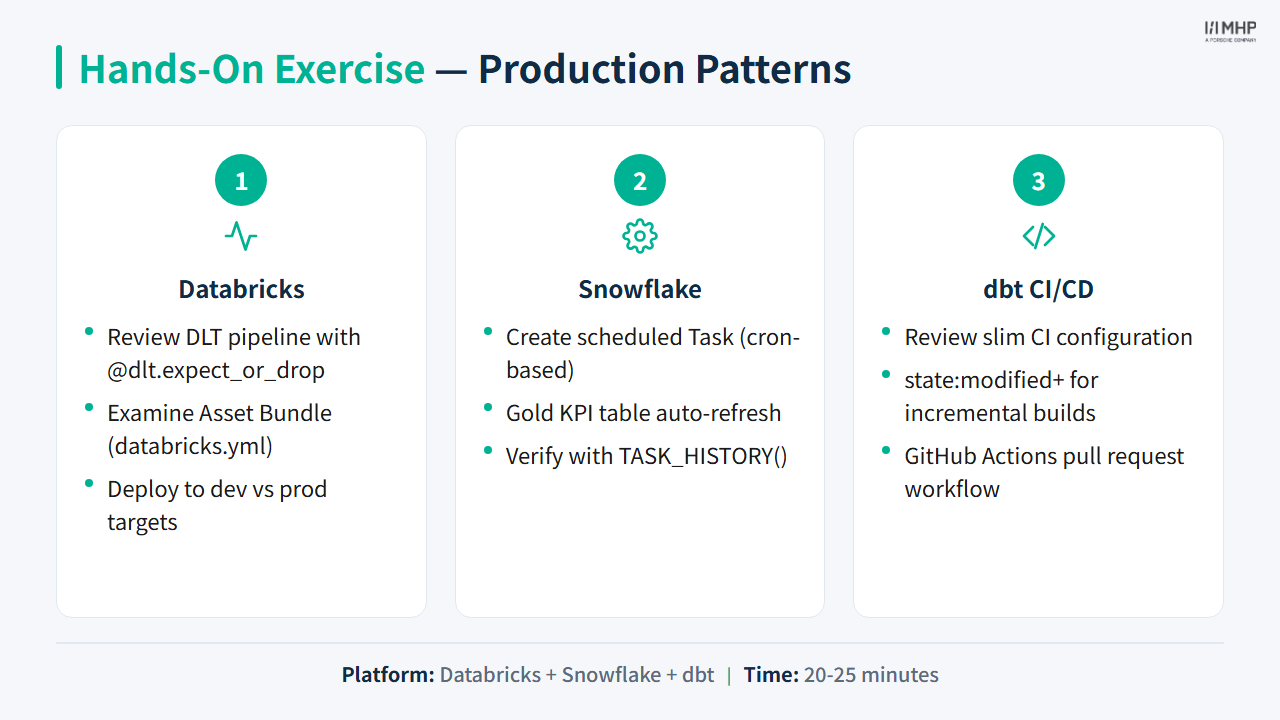
Hands-on lab
Priya / Power BI: Production SLAs define how fresh Priya’s dashboard can be — batch refresh vs DirectQuery comes in Module 7.
Next module
Module 6: AI Features — Marcus asks whether AI can help analysts explore data faster.